Table of Contents
ToggleAI Claim Scrubbing: How It Finds Errors Before Submission
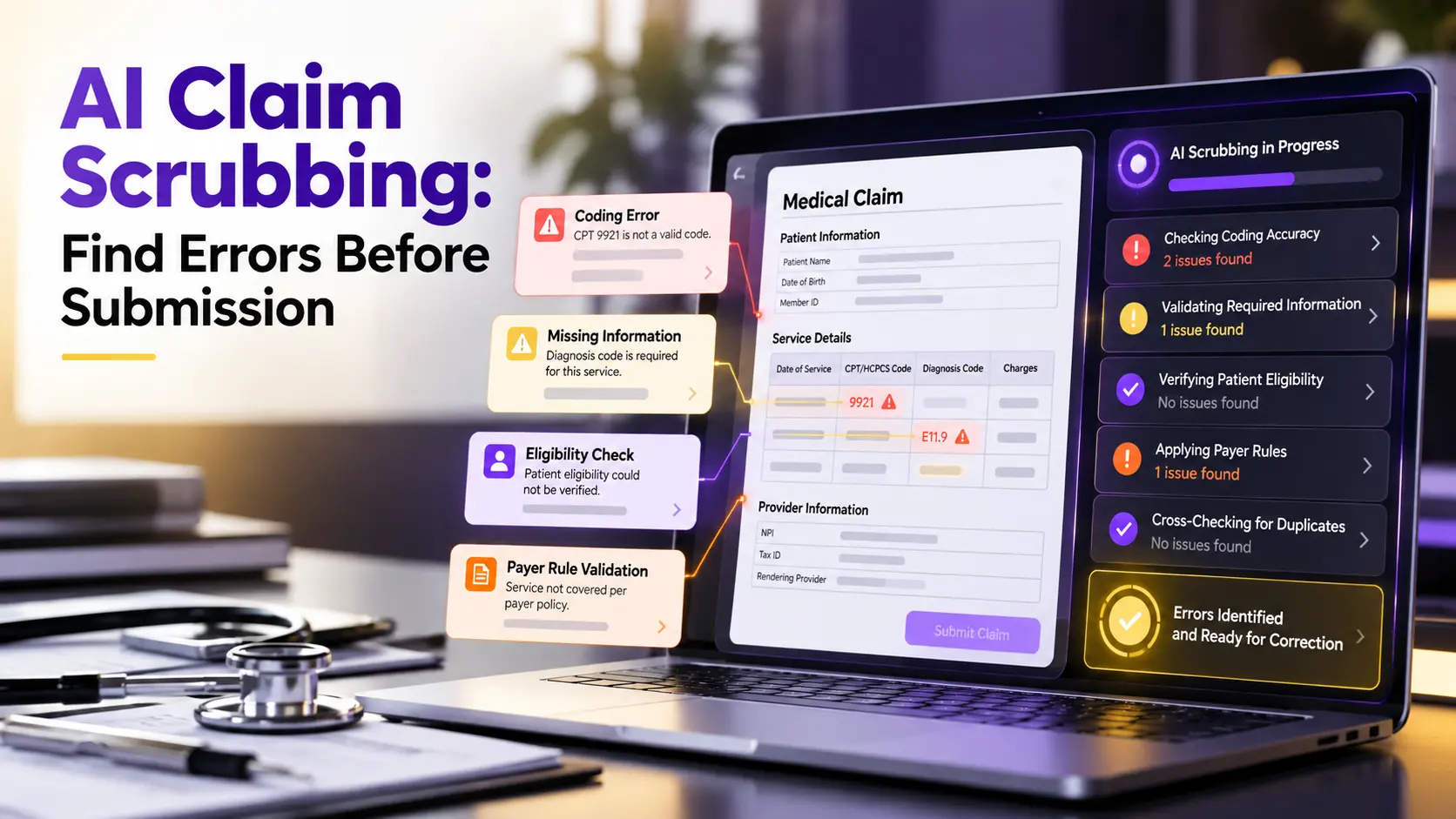
AI claim scrubbing reviews a medical claim before submission and looks for errors that may cause a rejection, denial, delay, or underpayment. It combines claim rules, payer knowledge, clinical context, and learned patterns to find problems early.
A strong scrubber checks more than code format. It can review patient and provider data, active coverage, diagnosis links, modifiers, units, authorization details, documentation, duplicate risk, and payer rules before the claim leaves the billing system.
This guide explains each step in plain language. It also shows where human review remains necessary, what providers should ask vendors, and how claim scrubbing can fit into a connected clean claim process.
Find the error before the payer finds it.
What Is AI Claim Scrubbing?
Claim scrubbing is the review of claim data before electronic submission. Traditional tools compare fields with fixed edits. AI assisted systems can also examine relationships between fields and use historical outcomes to highlight unusual or high risk claims.
The aim is not to guarantee payment. A payer can still deny a service based on coverage, medical necessity, contract terms, or information unavailable at submission. The goal is to remove preventable errors and send a stronger first claim.
Effective medical claim scrubbing gives billers a clear reason for every flag. Staff should know what is wrong, which source supports the warning, what correction may be needed, and whether the claim requires clinical review.
How AI Differs From Basic Claim Rules
A basic rules engine asks whether a field matches a known condition. For example, it may require a modifier with a code or reject a claim when a member number is missing.
AI can add context by comparing the claim with the encounter, documentation, payer behavior, and prior results. It may notice that a combination is technically valid but often fails for a specific plan without additional support.
The best systems use both approaches. Fixed edits provide consistent compliance checks, while AI helps prioritize risk, find hidden relationships, and improve from reviewed outcomes. Neither method should operate without an audit trail.
How an AI Claim Scrubber Works
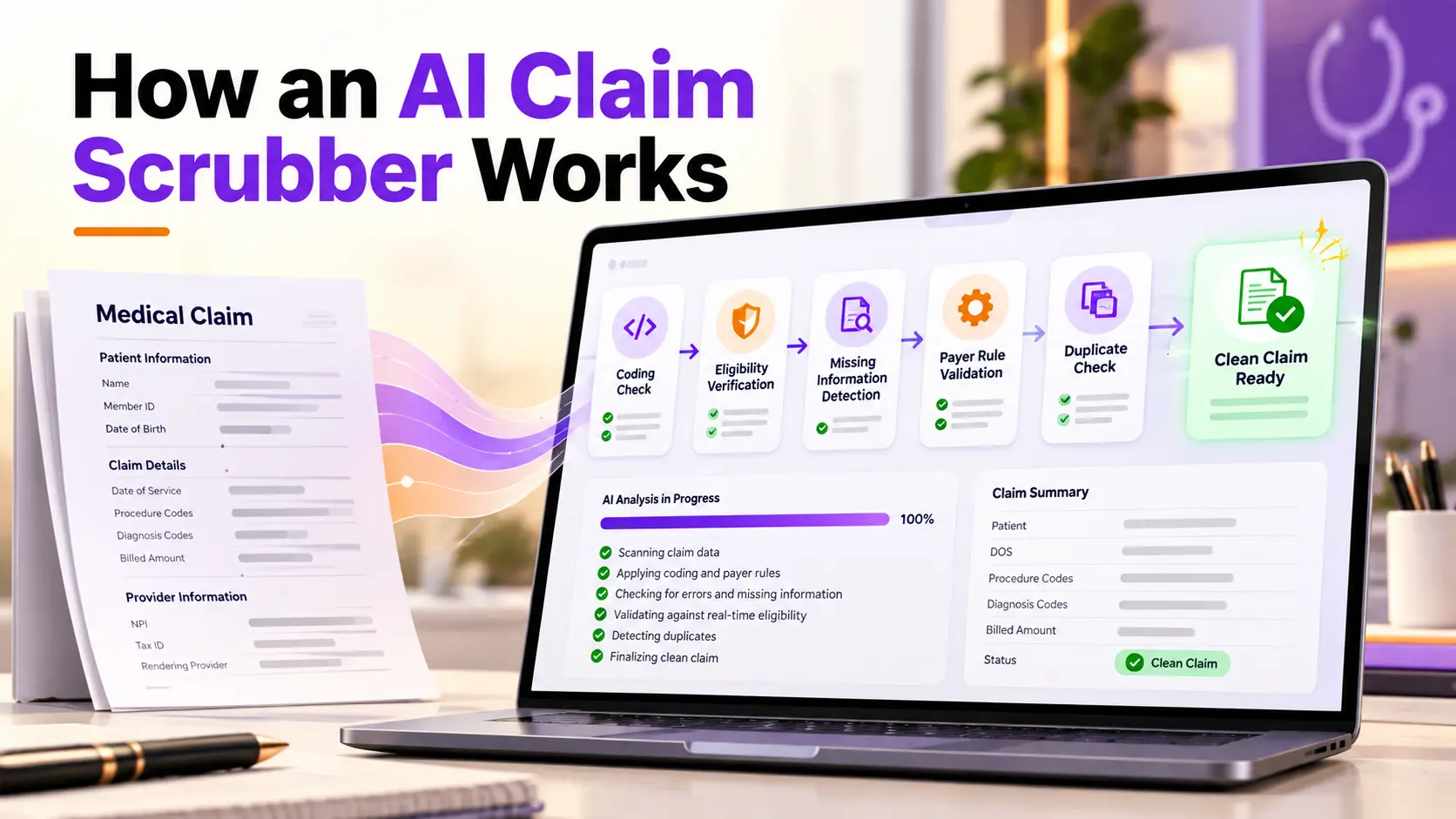
The process begins after an encounter creates charges and before the final claim is transmitted. The scrubber receives data from the EHR, practice management system, coding workflow, eligibility response, authorization record, and claim form.
It normalizes the information so names, dates, identifiers, codes, and payer details follow expected formats. It then runs validation steps and returns a clean result, a warning, or an exception that needs a person.
A safe system never changes important claim data without visibility. Suggested corrections should show the original value, proposed value, reason, confidence, and source so authorized users can review the decision.
Step One: Collect and Match Claim Data
The claim must match the correct patient, encounter, provider, and service. Errors can occur when interfaces create duplicate records, charges attach to the wrong visit, or data from different systems use different identifiers.
AI can compare names, dates, member details, medical record numbers, encounter dates, and charge information to find mismatches. It should stop uncertain cases instead of forcing a match simply to keep the workflow moving.
Identity checks also help prevent duplicate claims. The system can compare the current claim with earlier submissions, replacements, voids, and corrected claims before creating another payer record.
Step Two: Verify Patient and Coverage Details
Coverage errors often begin before coding. The patient may have an inactive plan, a changed payer product, incorrect subscriber details, missing coordination of benefits, or coverage that does not apply to the service date.
Connect automated insurance eligibility verification with the scrubber so it can compare claim data with a recent payer response. A stale eligibility result should trigger review when coverage may have changed.
The system should also identify benefit limits, referral needs, network concerns, and other details that may affect payment. Eligibility confirms coverage information, but it does not promise that every service will be paid.
Step Three: Check Provider and Payer Information
Claims can fail when the billing provider, rendering provider, facility, taxonomy, location, or enrollment information does not match payer records. A scrubber should validate required identifiers and their relationship to the service.
It can also check whether the place of service fits the claim type and procedure. Conflicts may show a documentation problem, a setup error, or a service entered under the wrong location.
Provider files change over time. Organizations need a controlled source for identifiers, payer enrollment, contracts, locations, and effective dates so the scrubber does not rely on an old configuration.
Step Four: Review Codes and Diagnosis Links
Coding review checks ICD 10, CPT, and HCPCS entries for valid format and effective dates. It also checks whether diagnosis pointers connect each service line with the condition that supports it.
Use AI medical coding to compare coded services with available clinical facts. The technology can suggest an issue, but it should never invent a diagnosis or add unsupported specificity.
The scrubber should detect deleted codes, nonbillable parent codes, age or sex conflicts, incompatible code pairs, missing laterality, and code combinations that require a closer review of the note.
Step Five: Find Modifier and Unit Errors
Modifiers explain important details about a service. A missing, incorrect, or unnecessary modifier can change payment, create an edit, or make a payer question whether services were distinct.
The system can apply NCCI edits, medically unlikely edits, unit limits, global period logic, and payer rules. It should show why a modifier or unit count is flagged rather than asking staff to accept a hidden correction.
Clinical documentation remains the source. A tool may identify that the reported units or modifier need support, but a coder must confirm that the note actually describes the service and circumstances being billed.
Step Six: Apply Payer and Coverage Rules
Payer edits can differ even when the same standard claim format is used. A service accepted by one plan may need a different attachment, frequency limit, diagnosis, referral, or submission route under another plan.
The scrubber should identify the payer product, not only the company name. Commercial, Medicare Advantage, Medicaid, and marketplace products can follow different policies under the same payer brand.
Rules must have dates and sources. When a vendor updates payer logic, the organization should know what changed, when it became active, and how the change affects claims already in progress.
Step Seven: Confirm Authorization Requirements
A claim may be clean in every other way but still fail because required prior authorization is missing, expired, tied to another provider, or approved for different units, dates, location, or service.
The scrubber should compare the authorization number and approved details with the claim. Connect automated prior authorization so approval data can flow into billing instead of being copied from a separate work queue.
When the data conflict, route the claim before submission. Staff may need to correct the claim, update the authorization, contact the payer, or confirm that an exception applies.
Step Eight: Detect Duplicates and Formatting Problems
Duplicate prevention compares patient, provider, service, date, units, charge amount, and prior submission history. It must distinguish a true duplicate from a corrected claim, replacement, separate encounter, or properly repeated service.
Formatting checks review required fields, character limits, dates, addresses, identifiers, claim type, and electronic file structure. Even a clinically correct service can reject when the transaction does not meet payer or clearinghouse requirements.
The system should monitor acknowledgments after submission. A 999 or 277CA response can reveal that a claim never entered adjudication, allowing the team to correct the issue without waiting for a later denial.
Step Nine: Find Documentation Gaps
Documentation gaps are harder to find than missing fields. The claim may contain valid codes, but the note may not support the billed level, procedure, modifier, units, or medical need.
AI can compare claim data with selected chart information and highlight missing or conflicting facts. It should point users to the relevant part of the record and explain the gap without writing unsupported content.
Only necessary records should be attached. Sending the full chart can expose unrelated information and make review harder. A focused packet should include the material the payer requires for the claim or policy.
How AI Scores Claim Risk
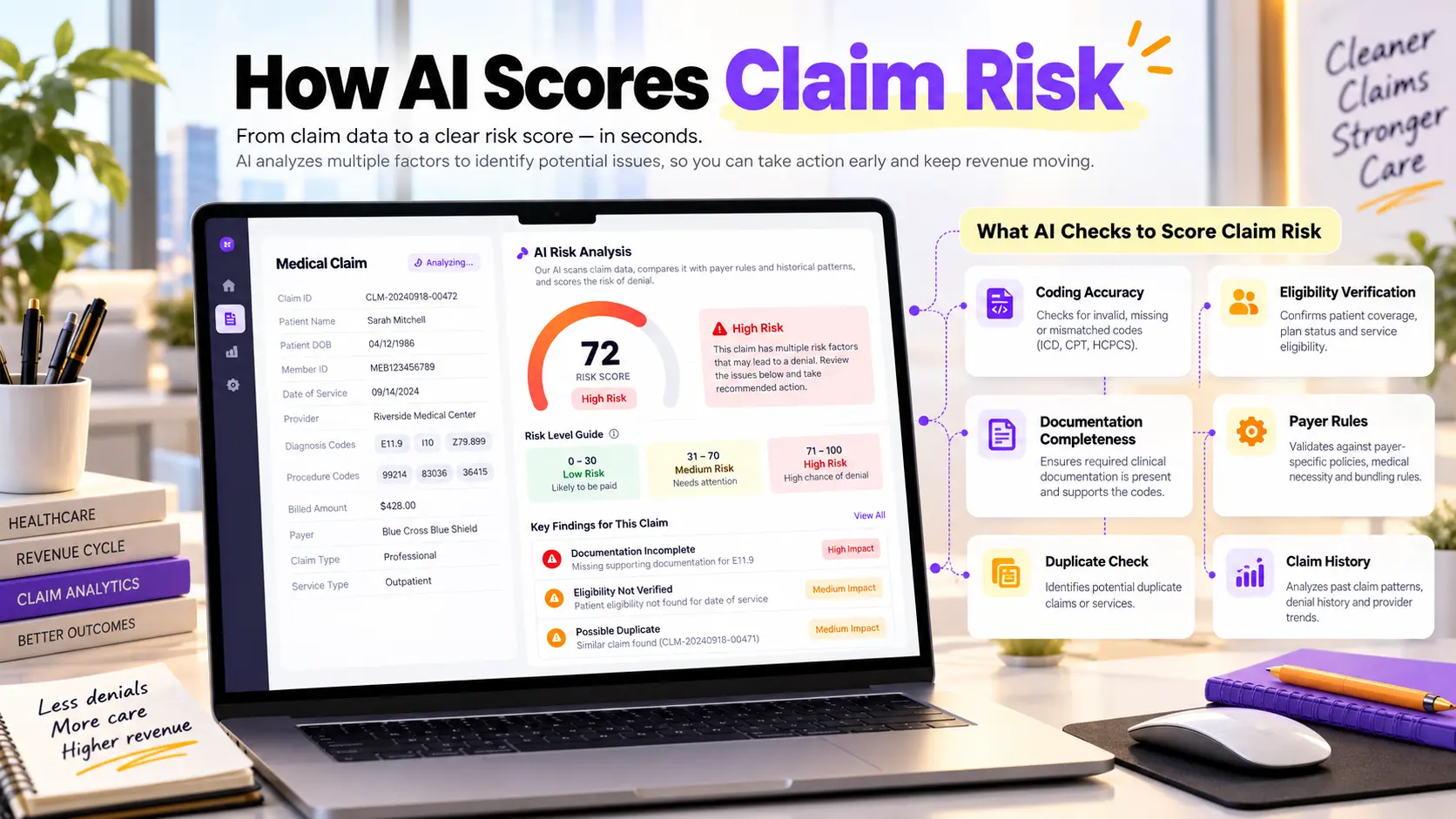
Some platforms assign a risk score to help teams prioritize review. The score may combine rule failures, missing data, payer history, unusual code relationships, documentation gaps, and earlier rejection or denial patterns.
A score is useful only when users can understand it. The system should list the factors behind the rating and separate a confirmed error from a prediction that deserves attention.
High risk does not always mean wrong. Low risk does not guarantee payment. Managers should monitor accuracy, false alerts, missed errors, and differences across payers and specialties.
Where Human Review Still Matters
Human reviewers remain essential for clinical judgment, unclear documentation, unusual services, conflicting records, compliance questions, modifier decisions, corrected claims, and cases where a proposed change affects reimbursement or meaning.
Automation should reduce repetitive checks so staff can focus on these exceptions. It should not pressure users to approve changes quickly or hide the information they need to make a responsible decision.
How It Connects With Your EHR and Clearinghouse
Create approval limits by risk and action. A simple formatting fix may follow one path, while a diagnosis, modifier, unit, provider, or documentation change should require the appropriate reviewer.
Security, Audit Trails, and Explainability
The scrubber should connect with the EHR, practice management system, clearinghouse, eligibility source, authorization workflow, and payer acknowledgments. Users need one visible status from charge creation through acceptance.
How to Compare Claim Scrubbing Solutions
Avoid creating another isolated inbox. Edited claims, reasons, user actions, submission confirmations, and payer responses should return to the systems where coding and billing teams already manage work.
Security review should cover encryption, access roles, audit logs, data retention, vendor access, incident response, and how patient information is used. The organization must also understand whether customer data trains any shared model.
Every correction and submission should be traceable. Explainability matters because staff, auditors, and leaders need to know why the system flagged a claim and who accepted or rejected the recommendation.
A Practical Rollout and Measurement Plan
Ask vendors to demonstrate real claims from your specialty. Treat denial prevention software as a workflow product, not a magic score. Include eligibility conflicts, coding edits, modifier questions, authorization mismatch, missing documentation, duplicate risk, and a clearinghouse rejection during the test.
Start with a controlled pilot and measure baseline results first. Track manual touches, time from encounter close to submission, rejection rate, denial rate, review volume, false alerts, and the clean claim rate.
Xoodoc clean claim automation checks eligibility, demographics, codes, modifiers, units, payer rules, authorization details, and clinical gaps before building and submitting the claim.
How Xoodoc Supports Clean Claims
Connect scrubbing with healthcare revenue cycle automation so acknowledgments, corrections, denials, payments, and follow up remain part of one traceable process. Review the official CMS electronic claims guidance before changing a live submission workflow.
Frequently Asked Questions
What is AI claim scrubbing?
It is the use of rules and artificial intelligence to review claim data, payer requirements, coding, and supporting records before submission so staff can fix likely errors early.
What errors can an AI claim scrubber find?
It can flag patient and coverage mismatches, invalid codes, missing modifiers, unit conflicts, payer edits, authorization gaps, duplicates, formatting problems, and weak documentation support.
Does claim scrubbing guarantee payment?
No. It reduces preventable errors, but payment still depends on coverage, medical necessity, contract terms, payer review, and accurate information.
Can AI change diagnosis or procedure codes automatically?
A safe system should show the proposed change, reason, confidence, and source. Material coding changes should follow organization policy and receive qualified human review.
How does claim scrubbing reduce denials?
It finds issues before the payer receives the claim, allowing the team to correct missing, conflicting, invalid, or unsupported information before it becomes a rejection or denial.
How should a provider evaluate a claim scrubber?
Test real specialty claims and compare accuracy, payer coverage, explanations, EHR connections, security, false alerts, workflow fit, implementation support, and measurable financial results.